
Anyone who has tried to block Copilot Studio agent creation in specific environments will likely find that the native controls do not quite solve the problem.
They often apply at an inappropriate level, only restrict part of the experience, or are simply not applicable to the Default Environment.
So I built a reusable control for it.
The solution blocks agent creation at the Dataverse layer, logs the attempt centrally, and sends the user a Teams notification with the appropriate governance guidance. I share the solution in my repository so it can be reused in other tenants.
This article focuses on that specific control. For the broader governance landscape across licensing, restrictions, monitoring, and maker management, see Copilot Studio Governance: The Complete Admin Reference (2026).
On this page
Why Blocking Agent Creation Matters
Left unchecked, agents get created wherever a maker happens to land, including the Default Environment, with no ownership, guardrails, or visibility. A few reasons to control where that creation is allowed:
- Onboard makers first: Blocking in environments, like the Default Environment, can help guide makers go through the right materials and key concepts before they start building.
- Enforce an environment strategy: Some environments might not be supported for agent creation, for whatever internal reason, and blocking makes that boundary real.
- Restrict to Managed Environments only: Managed Environments provide more controls (sharing limits, environment group rules, data policies, monitoring) and, at this time, do not add extra Copilot Studio licensing or credit consumption cost. That combination makes it reasonable to mandate Managed Environments for agents and block creation everywhere else. For the full nuance, see Restrict Agents at Environment Level.
Why Native Controls Fall Short
The governance requirement sounds simple: allow Copilot Studio agent creation in some environments, and block it in others. The problem is that the controls Microsoft currently provides do not map cleanly to that requirement. Each control applies at a different level, restricts different aspects, or has constraints that make it unsuitable for environment-level creation blocking.
| Control | What it does | Why it falls short |
|---|---|---|
| Licensing & Authors setting | Restrict who can create via controlling the Copilot Studio User license and/or who is assigned to the Authors security group | Tenant-scoped only; cannot restrict per-environment. No way to say “this user can create in Environment A but not in Environment B.” |
| Security roles (Environment Maker) | Control who can create agents through security role assignment in an environment | Environment Maker is the practical standard role for makers, so removing it breaks broader scenarios. In the Default Environment, it cannot be removed. Also doesn’t block System Customizer or System Administrator. |
| Data Policies | Restrict what agents can do (channels, connectors, knowledge sources) | Doesn’t block creation; users can still build and access unconstrained capabilities |
| Publish Copilots with AI features (tenant setting) | Prevent publishing agents with generative AI features | Tenant-wide only; still allows building and testing in test pane |
The native options are real, but fragmented. They can reduce risk and should still be part of the governance baseline. They just do not provide a clean environment-level control to say that agents should not be created here.
For the detailed breakdown of those native controls and their governance implications, see Copilot Studio Governance: The Complete Admin Reference (2026).
The Solution
The solution I built separates into two parts:
- A satellite solution deployed to each environment where agent creation should be controlled
- A core solution deployed once in a central environment
The satellite solution contains the blocking logic with a Dataverse plugin. The core solution contains the centralized logging and notification logic.
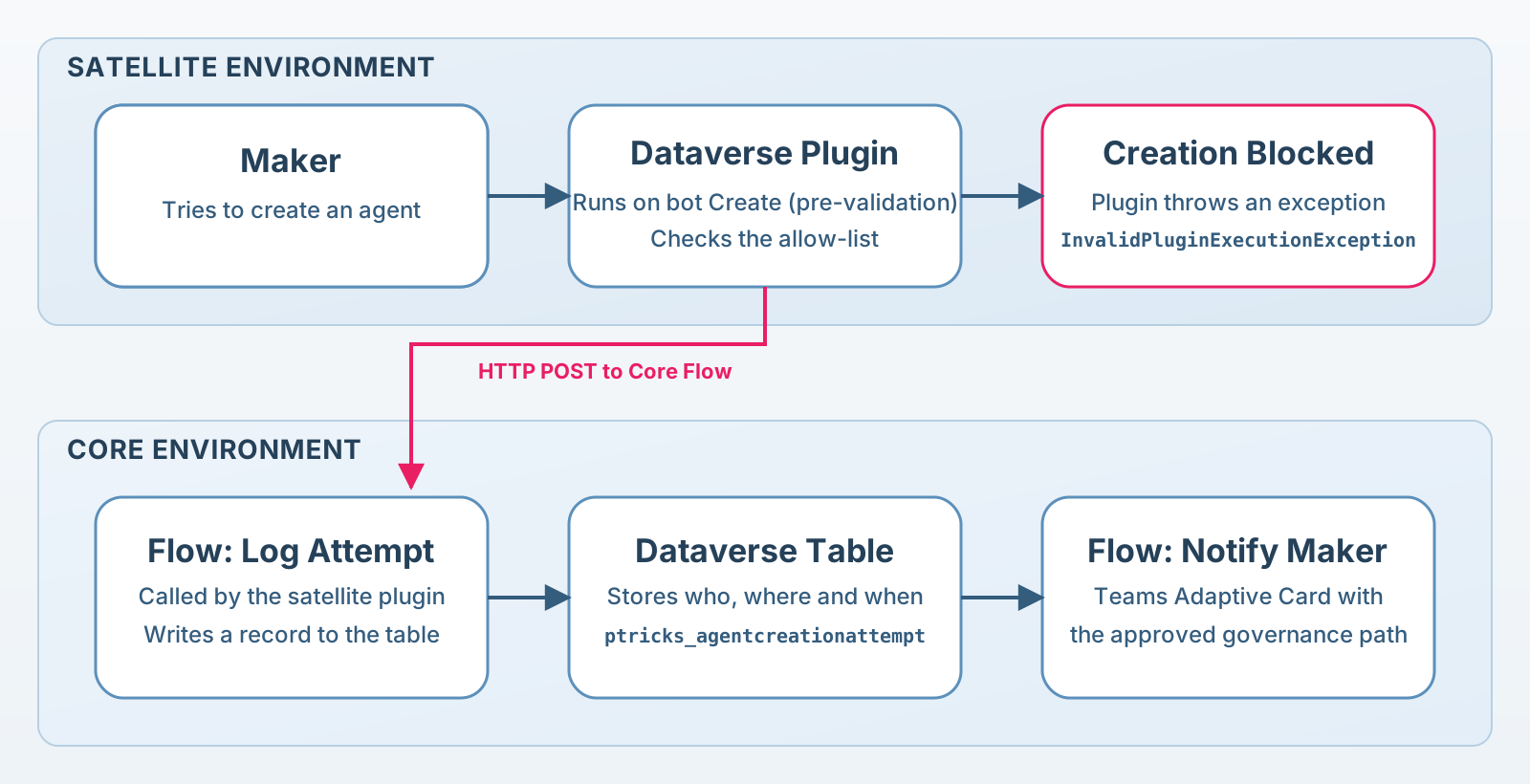
At a high level, the flow is:
- A maker tries to create an agent in Copilot Studio
- Copilot Studio writes into the
bottable to create the agent - The satellite plugin intercepts the write to the
bottable - The plugin calls a flow from the core solution
- The core flow logs the attempt in a central Dataverse table
- A second core flow sends the user a Teams Adaptive Card with guidance
- The plugin throws an exception so the agent creation fails
This provides three things at once:
- Actual blocking at creation time
- Centralized traceability across environments
- A consistent user communication path that does not depend on how the Copilot Studio portal chooses to surface errors
Demo Video
For the ones appreciating a demo video, the great Parvez Ghumra recently invited me in his Power Widgets Deep Dives YouTube Series:
What the User and Admin Experience Looks Like
From the maker’s point of view, the experience is straightforward.
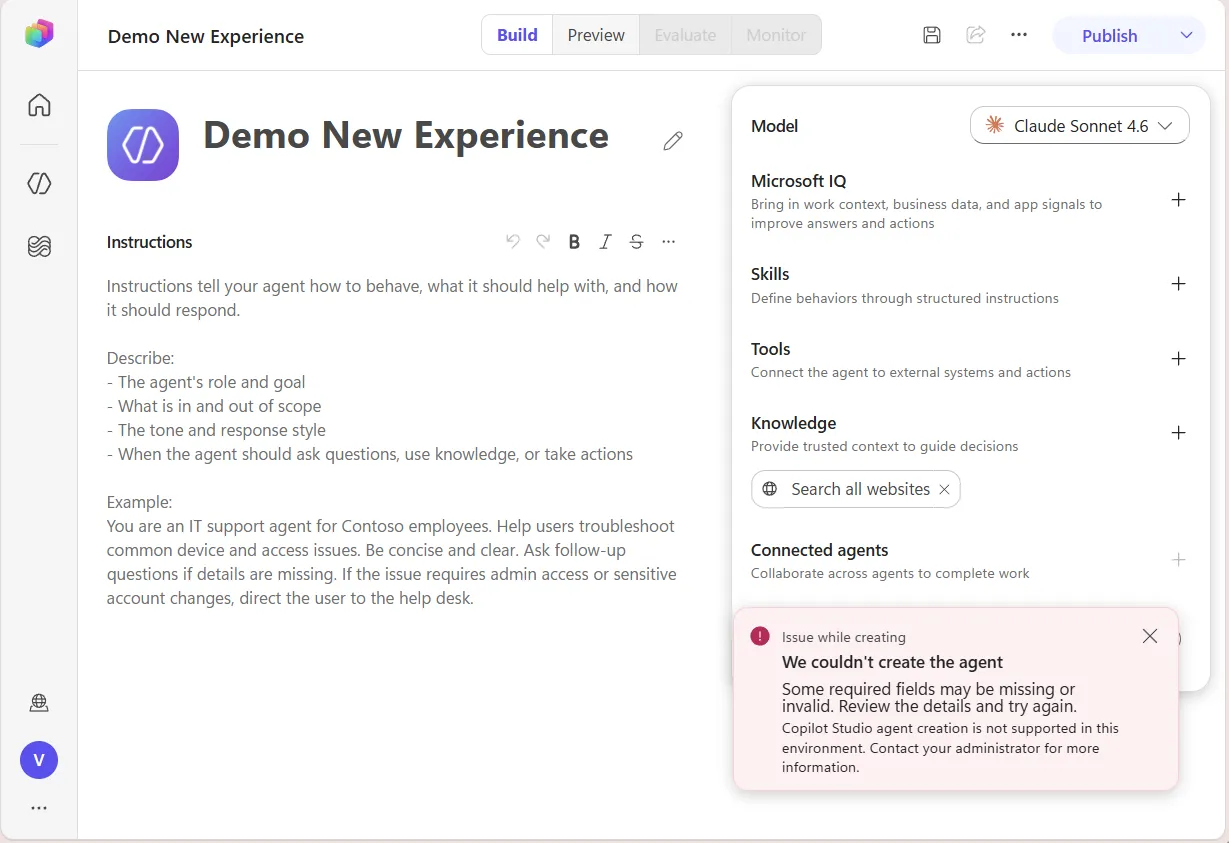
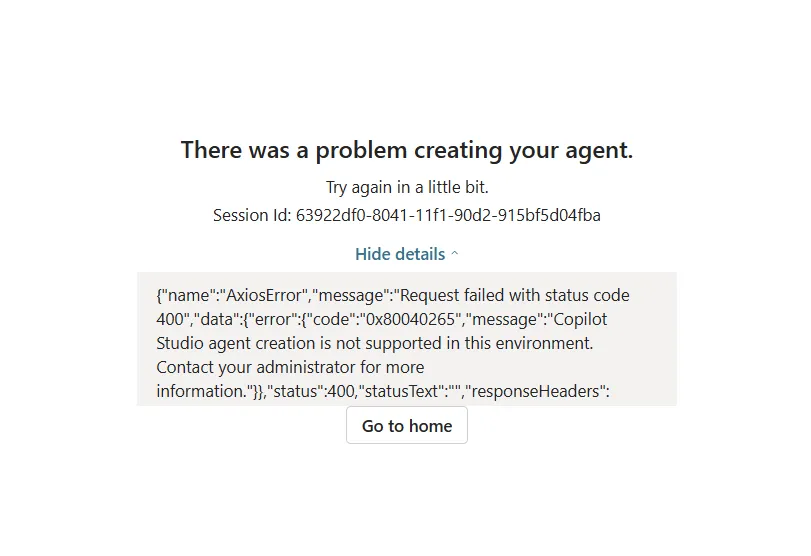
If the creation is blocked, the user gets an error during agent creation. Depending on current portal behavior, that error may show the custom exception message thrown by the plugin.
Independently from that, the user receives a Teams Adaptive Card explaining what happened and what to do next. That message can point to the governance guidance, approved environments, the request process, or any internal documentation that should be surfaced. The card also adapts to the reason the creation was blocked, which matters once the environment only blocks part of the creation experience, as covered under Blocking Only the GitHub Copilot Harness below.
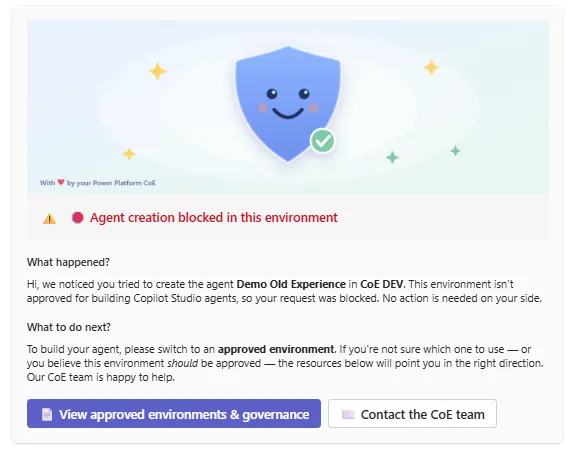
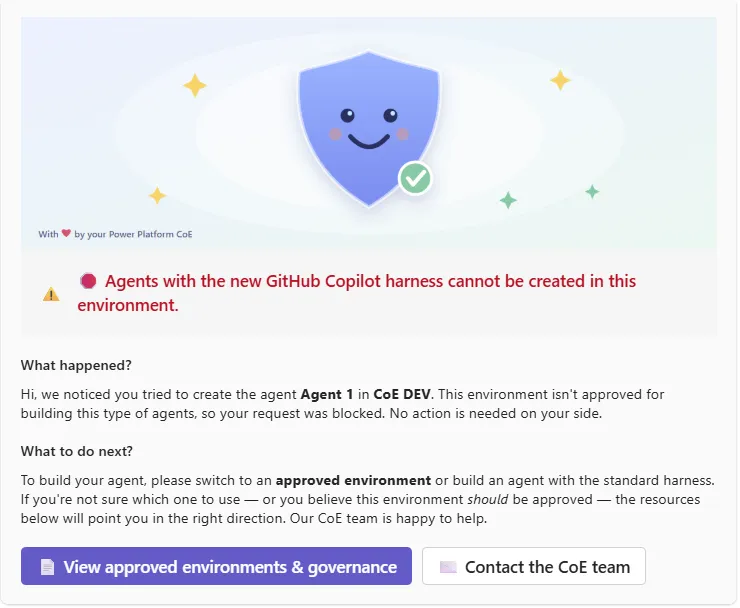
This is an important part of the design. Blocking without explanation creates support noise. Blocking with a clear next step creates a governance process.
From the admin or CoE point of view, every attempt is captured centrally in the core environment. That creates an audit trail of who tried to create an agent, where, and when. It also provides visibility into demand. In some organizations, that demand signal is useful in itself because it helps identify where enablement, training, or additional approved environments may be needed.
Creation can also be allowed for specific makers through a configurable allow-list, covered under Configuration below. Those users follow the same path, except they are not blocked, and their attempts are still logged so visibility remains on who is using the exception path.

How the Block Works Technically
The key idea behind the solution is that Copilot Studio stores agent configuration in Dataverse.
More specifically, the platform writes to tables such as bot and botcomponent. For the creation scenario, the important point is simple: when a user creates an agent, Copilot Studio attempts to write a record into bot.
If that write is blocked, the agent cannot be created.
That makes the bot table a reliable interception point for creation control. The plugin runs before the write completes, evaluates whether the user should be allowed, logs the attempt through the core flow, and throws an exception when the creation should be blocked.
This Dataverse structure is also what makes governance reporting efficient. Because agent metadata and component definitions are already persisted in bot and botcomponent, we can query and model that data at scale to report on agent configuration, as shown in Better Govern Agents with the Copilot Studio Monitor.
Keeping the Control Enabled
A practical concern with any plugin-based control is that the plugin step can be turned off. Under the way Power Platform security roles are currently designed, any user with the Environment Maker role can disable a plugin step. That would silently switch off the control, and because the role is broadly granted, this is not something that can be locked down through roles alone.
To protect against that, the satellite solution includes a flow that watches the plugin step and automatically turns it back on if it is ever disabled. Makers do not have access to this flow, so the same path that lets them disable the step does not let them keep it disabled.
Disabling the control on purpose therefore becomes a deliberate admin action, done in one of two ways:
- Turn off the self-healing flow first, then disable the plugin step, or
- Delete the satellite solution from the environment altogether.
Either way, switching the control off is an explicit, admin-level operation rather than something a single maker can do unnoticed.
Blocking Only the GitHub Copilot Harness
Since version 2026.09.04.1, released for both the core and the satellite solution, the satellite can run in one of two modes, controlled by a single Yes/No environment variable:
- Full block: every agent creation in the environment is a candidate for blocking. This is the original behavior and stays the default.
- GitHub Copilot harness only: only agents built on the GitHub Copilot harness are candidates for blocking. Agents created on the standard harness are always allowed, regardless of the allow-list.
In both modes, the allow-list keeps its role: it is the per-maker exception that lets a named maker through a block that would otherwise apply. The GitHub Copilot harness only mode simply changes which creations the block considers in the first place.
The distinction is made on the template column that Copilot Studio writes into the bot record at creation time. Agents provisioned through the GitHub Copilot harness carry a template value that starts with cli, so the plugin uses that prefix as the signal. When the mode is on and the plugin cannot read a template value, it does not block, keeping the narrowed mode scoped to confirmed GitHub Copilot harness creations only.
Treating the GitHub Copilot harness differently is worthwhile because it changes the cost profile of building and running an agent:
- Development and evaluation inside Copilot Studio consume Copilot credits on the GitHub Copilot harness. On the standard harness, that authoring and testing loop is free.
- Standard end-user usage of an agent on the GitHub Copilot harness is not covered by the Microsoft 365 Copilot user license, so it draws on message capacity or pay-as-you-go billing instead.
- Beyond that, there are reports that billed usage on the GitHub Copilot harness consumes more capacity per interaction than the equivalent on the standard harness. This is not confirmed by official documentation, so it is worth validating against a tenant’s own consumption data before relying on it.
Because a maker can now be blocked for two different reasons, the core solution carries two card configurations rather than one. The notify flow picks between them on a flag written to the attempt record, so the maker is always told the reason that actually applies. A full block produces the original card, saying agent creation is not allowed in this environment at all. A harness-only block produces a card that says regular Copilot Studio authoring is fine here, and that only the GitHub Copilot harness is off limits, which lets it offer the standard harness as an immediate alternative rather than sending the maker to another environment. Both variables hold the same JSON shape, so the wording is written once per scenario and the {AgentName} and {EnvironmentName} placeholders work in both.
Put together, the GitHub Copilot harness is something to adopt deliberately rather than by default. Blocking it selectively, while leaving the standard harness open, gives makers a working authoring experience without an unmanaged credit and capacity exposure. A reasonable starting posture is to enable GitHub Copilot harness only mode everywhere, and to keep it strict in high-traffic environments such as the Default Environment, then lift the restriction in the specific environments where the GitHub Copilot harness is the right tool for the workload.
Configuration
The solution is designed to be adjusted per environment without touching the plugin code. Most of what a team needs to change is exposed through environment variables and the core notification flow:
- The notification flow’s content and calls to action. Two JSON environment variables drive the Teams Adaptive Card, one for a full block and one for a harness-only block, so almost every visible element can be tailored per scenario without touching the flow: the header image, the title, the intro and next-steps text, and a list of links or buttons, each with its own label, URL, and style. The intro text also supports placeholders such as
{AgentName}and{EnvironmentName}, which are substituted at runtime, so the message can name the exact agent and environment the maker attempted to create. - The allow-list. The satellite solution exposes an environment variable containing a comma-separated list of email patterns. If the maker’s email matches one of those patterns, creation is allowed rather than blocked. The attempt is still logged either way, so the same mechanism supports both hard blocking and controlled exceptions without losing visibility into who is using them.
- The GitHub Copilot harness only toggle. A Yes/No environment variable controls whether the block applies to every agent creation or only to agents created on the GitHub Copilot harness. It defaults to No (full block). Turning it on in a given environment narrows the control there without affecting the others.
- The plugin exception message. The error thrown by the plugin when creation is blocked is exposed as an environment variable, so the message surfaced by the portal can be tailored per environment without changing the plugin code.
- The core flow endpoint. The satellite solution has an environment variable pointing to the core solution’s HTTP-triggered logging flow, so each satellite deployment knows where to send its attempts.
The technical setup for each of these is explained in detail in the repository’s README.md.
Deployment Model
The deployment model is intentionally simple. The core solution is installed once in a central environment, the satellite is configured there, and the configured satellite is then distributed to every environment where creation should be blocked.
-
Set up the core solution
Install it once in a central environment. It holds the Dataverse table that logs creation attempts and the flows that write the log and send the Teams Adaptive Card.
-
Configure the satellite solution in that same central environment
Install the satellite alongside the core solution so the endpoint variable can be configured to point at the logging flow. Also set the default exception message and the allow-list. The satellite solution is now ready to be exported.
-
Distribute to each blocked environment
Export the configured satellite, then import it wherever agent creation should be blocked. For repeatable rollout at scale, pair it with the Solution Deployer.
-
Tune each environment independently
The plugin exception message and the allow-list are environment variables, so each satellite environment can adjust them without touching the others.
That split keeps the blocking logic close to the environment being controlled, while keeping reporting and notification centralized. It also means the rollout can scale gradually: there is no need to deploy everywhere at once, so it can start with the environments where the governance requirement is strongest, then expand.
When to Use This Approach
The decision of where agents should and should not be created is governance, not technical. Every organization draws that line differently based on who is expected to build, what the enablement path looks like, and which environments are meant for production versus experimentation.
The harder question is how to enforce the “should not be created here” side of that line. There are two options:
- Native controls only: Licenses, security roles, and data policies can restrict a lot, but in most cases makers can still create an agent, just a heavily constrained one. That tends to disappoint them: they can create something, yet not anything meaningful, and it is rarely obvious why. The experience reads as broken rather than governed.
- This custom control: Creation is blocked outright, and makers are guided toward the approved path through a clear message and supporting communication. The tradeoff is that it is a custom control: it depends on current platform behavior and needs to be maintained as (if) that behavior evolves.
Native controls should stay the baseline wherever they are enough. The custom block earns its place when a partially restricted experience would confuse makers more than a clean “not here” would, and when there is an approved environment or request path to redirect them to.
What This Enables Next
Although this solution focuses on creation control, the broader pattern is more interesting than that.
The first extension is feature-level control. The botcomponent table opens the door here, because many feature-level settings are represented there. This first solution focuses only on agent creation, but because Copilot Studio configuration is stored in Dataverse, the same principle could be applied to specific settings written into botcomponent. That creates possibilities beyond what data policies and environment settings/rules support today, especially if environment-level controls are needed on very specific agent capabilities.
The second extension is gated provisioning. Instead of letting every eligible maker create agents directly, the same pattern could route creation through a controlled path. That path can be a small group of allowed power users or admins, or an automated process behind a request app where a maker submits a use case and the required metadata. In both cases, the agent only comes into existence after a lightweight review, and naming, metadata, and ownership can be enforced up front. The requesting maker is not locked out either: once the agent exists, its ownership and edit rights can be shared back so they can build on it. This is a familiar pattern in other collaboration workloads, such as the controlled provisioning many organizations already use for Microsoft Teams creation.
So even if the immediate need is simply to block agent creation in a given place, the architectural pattern can support broader governance controls later.
Conclusion
Blocking Copilot Studio agent creation by environment is still harder than it should be with native controls alone.
The solution in this article works around that gap by intercepting creation at the Dataverse layer, logging attempts centrally, and giving users a more consistent and explainable experience through Teams notifications.
If the governance model requires a clear “not here” answer for specific environments, this gives a reusable way to enforce it.
Newsletter
Stay in the loop
Get notified when I publish new articles on Power Platform Governance.

About Valentin Mazhar
Microsoft MVP and certified Solution Architect specializing in enterprise Power Platform governance, AI enablement, and operating models. With 5+ years delivering governance programs in regulated environments, Valentin helps organizations scale low-code and AI securely, building the foundations that let makers and agents thrive without compromising control.


